
Binary System
Numbers, numbers, numbers - they have been with us for thousands of years. We keep trying to organize them, transform them, understand them, and write them down. One of the number systems we invented is the binary system, which forms the foundation of the entire IT world. Welcome to the world of zeros and ones.

Mateusz Jabłoński


From this article you will learn:
- Which number system did the Slavs believe in?
- What did the binary system have to do with weather forecasting in ancient China?
- How do you convert a decimal number to binary and back?
- What is stack overflow?
- How many 0s and 1s fit on a one-terabyte drive?
Counting seems to be one of the most basic human skills. It is one of the first things we teach our children, right after eating, walking, and speaking. It appeared in our societies a very long time ago, as soon as there was a first need to describe the number of things: possessions, trade goods, supplies. According to archaeologists, the first attempts to write down numbers appeared around 10-11 thousand years ago, although some sources reach even further back.
Of course, those first attempts were not very efficient. Numbers were written as strokes on clay tablets, tree bark, or stones. The size of a number was determined by the length of the line that had been written down. This number system is called the unary numeral system, or the tally system. Over time, however, humans discovered that this way of writing was not very efficient and was quite time-consuming. We started grouping numbers by 3, 5, or 10. Each group had its own symbol. The anatomy of the human hand probably helped us here: the earliest groups we discovered were 5 and 10. And although it sounds naive, counting on fingers has always been the most accessible method. This discovery let us develop the number systems we know today.
Depending on the region, every community used its own specific way of marking numbers. Sometimes these were values assigned to consecutive letters of an alphabet, and sometimes they were completely new signs.
As a curiosity, it is worth adding that a system based on the number 3, the so-called nonary system, appeared in areas inhabited by the Slavs. Most likely, this particular system was used because the number 3 was considered magical by Slavic peoples. Today, it has been displaced by the decimal system.
Additive and Positional Systems
Before we move on to the binary system, I would like to draw attention to the division of number systems. According to the usual classification, there are two basic groups: additive and positional number systems.
A positional system consists of two elements: a set of the smallest natural numbers and a base, which can be any number greater than 1. The value is determined by multiplying numbers from the set by powers defined by the base of the system. This may sound a little complicated, but in fact it is very simple. To get the number 321 in the decimal system, we would have to perform the following operation:
# decimal system
(3 * 10^2) + (2 * 10^1) + (1 * 10^0) = (3 * 100) + (2 * 10) + (1 * 1) = 321
Positional systems accompany us every day. Additive systems look a little different. They are based on adding together the values of consecutive symbols. The Roman numeral system can serve as an example. Notice that the Roman number MDCCC is the sum of M, D, C, C, and C, respectively 1000, 500, 100, 100, and 100, so 1800.
Apart from the decimal system already mentioned, the binary, octal, and hexadecimal systems are also widely used, although the last three mostly in computer science. Each of these systems is positional.
Binary System
The binary system appeared long before the first computer was built. Gottfried Wilhelm Leibniz is considered the father of the binary system. In 1703, Leibniz published an article titled "Explication de l'Arithmétique Binaire", where he described the basic assumptions of the system. It is worth adding that the binary system had already been known earlier. In the 16th century it was used by John Napier, a Scottish mathematician who, in his version of the system, used the letters a and b instead of 0 and 1. Even earlier, the ancient Chinese used the binary system, around 1000 BCE, to determine positions on a game die and to forecast the weather.
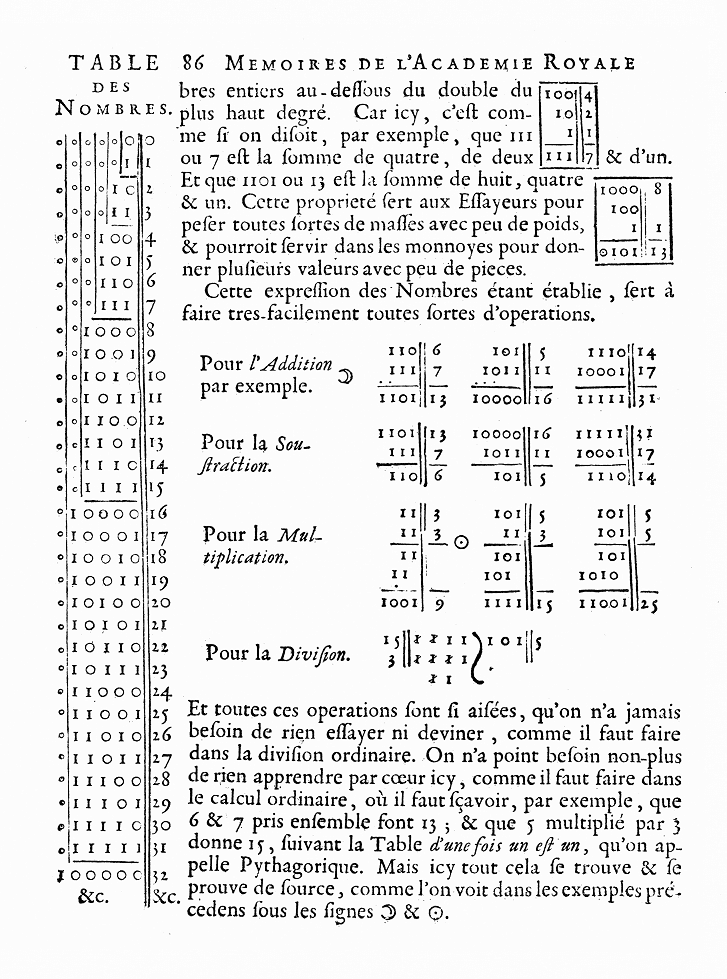
The binary system described by Leibniz in 1703
The binary system is based on the number 2. This means that to write a number, we need to know powers of 2. In practice, raising 2 to consecutive powers is relatively simple. The next values are: 2, 4, 8, 16, 32, 64, 128, 256, 512, 1024, 2048... and so on.
How to Convert a Decimal Number to Binary
To write a decimal number in the binary system, we need to perform a few simple calculations. Let us take the number 14 as an example. The operation we will use is division with a remainder. The whole number produced by division, in this case 7, will be used for further calculations, while the remainder, 0, will give us the proper value for the next binary position. We should continue the calculations until we reach the whole number 1. If we write our calculations in a column, then read them from the bottom, we will find our binary number. Look at the example below:
14 % 2 = 7 remainder 0
7 % 2 = 3 remainder 1
3 % 2 = 1 remainder 1
1 % 2 = 0 remainder 1
14(10) = 1110(2)
In the example above, after the number 14 I wrote 10 in the lower bracket. This means a decimal number. For 1110, I wrote two, which means a binary number. Using subscripts, we can write numbers in different number systems.
Binary to Decimal
Let us try to reverse this process. As I mentioned earlier, binary numbers are based on powers of 2. Let us write our binary number in a column and assign consecutive powers of 2 to its individual values, starting from 1. The last digit of the binary number should be assigned the smallest value, 1, and the first digit should be assigned the largest consecutive power of 2. Then we need to perform simple calculations: multiply 0 or 1 by the power assigned to it, and finally add everything together. Let us look at an example:
1 | 8
1 | 4
1 | 2
0 | 1
(1 * 8) + (1 * 4) + (1 * 2) + (0 * 1) = 8 + 4 + 2 + 0 = 14
Conversion in JS
Converting a decimal number to a binary number is, in principle, a purely mathematical operation, and programming languages can handle it as well. In JavaScript, we can do this in several ways. Below is one of them.
const decimal = 14;
const radix = 2;

decimal.toString(radix); // 1110
Wait! The toString method does not take any parameters, does it? And suddenly we are passing a radix to it. Radix is nothing more than a number from 2 to 36 that defines the base of the number system. By default, this value is 10. It is also true that the toString method does not take parameters in every case, but the call above refers to its implementation on the Number prototype, where its behavior is slightly different. For example, it allows us to add an optional parameter that defines the base of the number system. To perform the reverse operation, of course, we need to choose the right radix and write the binary number in a way that lets JS know it is binary. The prefix 0b will help us with that.
const binary = 0b1110;
const radix = 10;

binary.toString(radix); // 14
The World of Computers
There are many number systems. The binary system is not the most intuitive one, and yet it is the foundation of how every computer works. So why do computers use the binary system?
The answer is almost painfully simple. With 0 and 1, we can very easily represent a state or the absence of that state. In electronics, for example, this could be the absence or presence of voltage. In other words, with 0 and 1 we can represent a cycle that is quite important from the point of view of the device we are working on. Of course, for the user it would be much more interesting to have more options than just two, for example ten, using the digits from 0 to 9. Introducing the decimal system into electronics would force us to find 10 different signals that would represent individual values. Even if we managed to do that, such a system would be vulnerable to interference that could distort the message. It is easy to imagine small mistakes caused by infrastructure problems, such as voltage spikes.
The binary system also has its drawbacks. We cannot use it directly to write negative numbers, because for negative numbers we reserve a proper part of memory for an additional sign. We need quite a large number of digits to write values, and we also have the phenomena of overflow, or stack overflow, and underflow, or under overflow. Despite that, this system seems to fit the requirements of the machines we work with better than the alternatives.
The binary system was chosen for one more reason. It is very easy to implement on a transistor. A transistor is an electronic component that was invented in the 1920s. Its task was to amplify an electronic signal, meaning to increase its power. Transistors replaced previously invented triodes and vacuum tubes, which served the same functions but were much less efficient. They consumed much more energy and took up quite a lot of space. The first vacuum-tube computers occupied entire rooms. Thanks to their small size, transistors conquered the world. Without them, today we would not have mobile phones, portable computers, or all kinds of portable electronics.
Bit
We already know that computers could develop thanks to the invention of transistors. We also know that implementing the binary system with 0 and 1, where there is a signal or there is no signal, was much easier technically and less risky than implementing other number systems. So what does a computer do with these numbers? In principle, it writes them to memory, analyzes them, transforms them, and does all of that in order to perform the tasks, or algorithms, we give it. Each 0 or 1 is the smallest portion of information a computer can write in its memory. We call it one bit.
We group bits into bytes. Every 8 bits make one byte. Saving anything valuable with 1 bit would be practically impossible, but introducing the rule of 8 bits, or 1 byte, made it possible to save as many as 256 different characters. A byte is still not much. Each byte can store one letter, while words usually consist of many letters, not to mention whole sentences. So we started grouping further. 1 byte is 8 bits, 2 bytes are 16 bits, four bytes are 64 bits... Notice that the number of bytes grows like powers of 2. 2 to the power of ten is 1024, so 1024 bytes are 8192 bits. The prefix kilo traditionally means one thousand, but in a computer system we cannot reach that exact number in a way that fills all available bits completely. So a mental shortcut was used, and 1024 bytes were marked as 1 kilobyte. 1024 kilobytes are 1 megabyte, 1024 megabytes are 1 gigabyte, 1024 gigabytes are 1 terabyte, and 1024 terabytes are 1 petabyte.
Today's drives, where our data is stored, already have capacities measured in several terabytes. So how many 0s and 1s fit on a drive with a capacity of one terabyte? Exactly 8,796,093,000,000,000,000 zeros and ones. That seems like a lot, but let us remember that even the simplest photo may need several dozen million bits to be stored in computer memory.
Stack Overflow
Stack overflow is simply an overflow error that appears when, during mathematical operations on binary numbers, we get a number with an additional digit that does not fit into the number of bits reserved for the result. The problem will not occur if the result of the binary operation contains the same number of digits, for example 10 + 01 = 10. However, if we add the binary numbers 11 and 01, we get the result 100. As you can see, the result is a number made of 3 digits.
The consequences of such an error may lead to various problems, such as a system failure or unexpected results. The additional digit may be ignored, which means that from the operation above, 11 + 01, we get 3 + 1 = 0. Oops!
You can read about many interesting errors related, among other things, to binary numbers in Matt Parker's book Humble Pi.
Worth reading on this topic

Matt Parker
Pi razy oko. Komedia matematycznych pomyłek
Summary
As you can see, the road we took to programming was very long. First we had to learn to count on fingers, discover that we had as many as 10 of them, and eventually notice that a system based on the number two could be perfectly suitable for weather forecasting. For nearly two thousand years, the binary system waited for the invention of transistors so that humans could build machines capable of processing enormous amounts of data incredibly quickly.
Where are our programming languages in all of this? Instructions written in compiled languages, such as C, C++, or Pascal, are ultimately processed into a notation computers understand, meaning binary code. Interpreted languages stand in opposition to compiled languages, but that is a story for another time.
Sources
- Systemy liczbowe
- Historia systemów liczbowych
- System liczbowy
- Liczby binarne - podstawy
- Słowiańskie systemy liczbowe
- Dwójkowy system liczbowy
- Operacje na systemie binarnym
- Number.prototype.toString()
- Systemy liczbowe: System binarny
- John Napier
- Gottfried Wilhelm Leibniz
- Co to jest tranzystor, jak działa i za co odpowiada?
- Pięcioro dzieci, czyli 101
- System dwójkowy
- Co to jest system binarny (system dwójkowy)?
- Skąd liczba 1024 wzięła się w świecie IT?
- Binary






Comments (0)
No one has posted anything yet, but that means.... you may be the first.